NemoClawをさわってみた
Contents
Overview
ローカルのvLLMで起動したLLMを使って、NemoClawを動かしてみました。
Install NemoClaw
Linux + Docker の環境を使っています。最初に nemoclaw のインストールをします。
シングルコマンドで、インストールに続き、最初の sandbox のデプロイも始まります。
curl -fsSL https://www.nvidia.com/nemoclaw.sh | bash
███╗ ██╗███████╗███╗ ███╗ ██████╗ ██████╗██╗ █████╗ ██╗ ██╗ ████╗ ██║██╔════╝████╗ ████║██╔═══██╗██╔════╝██║ ██╔══██╗██║ ██║ ██╔██╗ ██║█████╗ ██╔████╔██║██║ ██║██║ ██║ ███████║██║ █╗ ██║ ██║╚██╗██║██╔══╝ ██║╚██╔╝██║██║ ██║██║ ██║ ██╔══██║██║███╗██║ ██║ ╚████║███████╗██║ ╚═╝ ██║╚██████╔╝╚██████╗███████╗██║ ██║╚███╔███╔╝ ╚═╝ ╚═══╝╚══════╝╚═╝ ╚═╝ ╚═════╝ ╚═════╝╚══════╝╚═╝ ╚═╝ ╚══╝╚══╝
Launch OpenClaw in an OpenShell sandbox.
[INFO] Installer stdin is piped; prompting for the third-party software notice on /dev/tty before install.
Third-Party Software Notice - NemoClaw Installer ────────────────────────────────────────────────── NemoClaw is licensed under Apache 2.0 and automatically retrieves, accesses or interacts with third-party software and materials, including by deploying OpenClaw in an OpenShell sandbox. Those retrieved materials are not distributed with this software and are governed solely by separate terms, conditions and licenses.
You are solely responsible for finding, reviewing and complying with all applicable terms, conditions, and licenses, and for verifying the security, integrity and suitability of any retrieved materials for your specific use case.
This software is provided "AS IS", without warranty of any kind. The author makes no representations or warranties regarding any third-party software, and assumes no liability for any losses, damages, liabilities or legal consequences from your use or inability to use this software or any retrieved materials. Use this software and the retrieved materials at your own risk.
OpenClaw security guidance https://docs.openclaw.ai/gateway/security
Type 'yes' to accept the NemoClaw license and and third-party software notice and continue [no]: yes
[1/3] Node.js ──────────────────────────────────────────────────[INFO] Node.js found: v24.18.0[INFO] Runtime OK: Node.js v24.18.0, npm 11.16.0
[2/3] NemoClaw CLI ──────────────────────────────────────────────────[INFO] Installer payload is not a persistent source checkout — installing from GitHub…[INFO] Installing NemoClaw from GitHub…[INFO] Resolved install ref: lkg ✓ Cloning NemoClaw source ✓ Preparing OpenClaw package ✓ Installing NemoClaw dependencies ✓ Building NemoClaw CLI modules ✓ Building NemoClaw plugin ✓ Linking NemoClaw CLI ✓ Installing OpenShell CLI[INFO] Created user-local shim at /home/sugi/.local/bin/nemoclaw[INFO] Created user-local shim at /home/sugi/.local/bin/nemohermes[INFO] Created user-local shim at /home/sugi/.local/bin/nemo-deepagents[INFO] Verified: nemoclaw is available at /home/sugi/.local/share/mise/installs/node/24.18.0/bin/nemoclaw
<このあと、sandbox の onboarding に進みます>NemoClawの作りを理解するのに、 nemoclaw --help でヘルプを見ておくのは良さそうです。
Onboarding
今回は、ローカルのvLLMを使いたいので、Onboardingの前に環境変数を入れておきます。 この環境変数を入れておかないと、providerでvLLMが選べないです。 OpenAI-compatible はありますが、それだと、うまく動かなそうでした。
export NEMOCLAW_EXPERIMENTAL=1export NEMOCLAW_PROVIDER=vllmexport NEMOCLAW_VLLM_PORT=8001 # vLLMを起動しているポートでは、sandboxをOnboardします。
nemoclaw onboard
Select your agent: 1) OpenClaw — Gateway-based AI agent with plugin ecosystem (openclaw.ai) 2) Hermes Agent — Self-improving AI agent with learning loop (Nous Research) 3) LangChain Deep Agents Code — Terminal coding agent built on the Deep Agents SDK
Choose [1]:
NemoClaw Onboarding ===================
[1/8] Preflight checks ────────────────────────────────────────────────── ✓ Docker is running ✓ Docker can start bridge containers ✓ Container DNS resolution works ✓ Docker CDI GPU support detected (/var/run/cdi/nvidia.yaml) ✓ Container runtime: docker ✓ Container runtime resources: 16 vCPU / 125.8 GiB ✓ openshell CLI: openshell 0.0.72 ✓ Port 8080 already owned by healthy NemoClaw runtime (OpenShell gateway) ✓ NVIDIA GPU detected (NVIDIA H100 NVL, 95830 MB) ✓ Sandbox GPU: enabled (auto) ✓ Memory OK: 128807 MB RAM + 8191 MB swap NVIDIA GPU detected; enabling OpenShell GPU passthrough. Use --no-gpu to opt out.
[2/8] Starting OpenShell gateway ────────────────────────────────────────────────── [reuse] Skipping gateway (running) Reusing healthy NemoClaw gateway.
[3/8] Configuring inference provider ────────────────────────────────────────────────── [non-interactive] Provider: vllm ✓ Using existing vLLM on localhost:8001 Detected model: google/gemma-4-31B-it Responses API available — OpenClaw will use openai-responses. ✓ Using vLLM max_model_len: 65536 tokens ℹ Using chat completions API (tool-call-parser requires /v1/chat/completions) Sandbox name (1-63 characters, lowercase, starts with a letter, letters/numbers/internal hyphens only, ends with letter/number) [my-assistant]:
────────────────────────────────────────────────── Review configuration ────────────────────────────────────────────────── Provider: vllm-local Model: google/gemma-4-31B-it API key: (not required for vllm-local) Web search: disabled Managed tools: none Messaging: none Sandbox name: my-assistant Note: Sandbox build typically takes 3–8 minutes on this host. ────────────────────────────────────────────────── Web search and messaging channels will be prompted next. Apply this configuration? [Y/n]:
[4/8] Setting up inference provider ──────────────────────────────────────────────────✓ Updated provider vllm-localGateway inference configured:
Route: inference.local Provider: vllm-local Model: google/gemma-4-31B-it Version: 7 Timeout: 180s ✓ Inference route set: vllm-local / google/gemma-4-31B-it
Enable web search for your agent? [1] No web search (default) [2] Brave Search [3] Tavily Search Choose [1-3]:
[5/8] Messaging channels ──────────────────────────────────────────────────
Available messaging channels: [1] ○ telegram — Telegram bot messaging [2] ○ discord — Discord bot messaging [3] ○ wechat — WeChat (personal) bot messaging [4] ○ slack — Slack bot messaging [5] ○ whatsapp — WhatsApp Web messaging (QR pairing) [6] ○ teams — Microsoft Teams bot messaging (experimental)
Press 1-6 to toggle, Enter when done (none selected skips): Skipping messaging channels.
Resource profiles: 1) creator (cpu=50%, ram=50%) 2) gamer (cpu=25%, ram=25%) 3) game-developer (cpu=60%, ram=60%) 4) developer (cpu=75%, ram=75%) 5) custom (enter values manually) 6) No profile (OpenShell defaults) Choose [6]:
[6/8] Creating sandbox ────────────────────────────────────────────────── Registry entry exists for 'my-assistant' but installer restore flag not set — skipping pre-upgrade backup select. Direct sandbox GPU enabled; allowing OpenShell GPU policy enrichment. Creating sandbox 'my-assistant' (this takes a few minutes on first run)... Pinning base image to sha256:718810eb8e6f... Building sandbox image with BuildKit (skips the slower in-gateway builder)...[+] Building 4.9s (82/82) FINISHED docker:default
<このあと、コンテナイメージのビルドが走ります>
=> exporting to image 1.6s => => exporting layers 0.0s => => exporting manifest sha256:1d9926b9d4657752f9f18ea24c0ff45d11de726e1423fa968bdb827cc038209d 0.0s => => exporting config sha256:75931563da0034461337ef7f058fee46efceb491107292db8ce5625ed3b33c5c 0.0s => => exporting attestation manifest sha256:f6ef1a3139386d3650eb8b9bcb41d41eb5f4599fb3ec9ac010b0a81327825f05 0.0s => => exporting manifest list sha256:7f354bfa7e36d2e1466f3cd29c17b6797fe82fd978b2f5b1986c4ebdf169310d 0.0s => => naming to docker.io/library/nemoclaw-sandbox-local:my-assistant-1784092108728 0.0s => => unpacking to docker.io/library/nemoclaw-sandbox-local:my-assistant-1784092108728 1.4s
6 warnings found (use docker --debug to expand): - SecretsUsedInArgOrEnv: Do not use ARG or ENV instructions for sensitive data (ENV "NEMOCLAW_PROVIDER_KEY") (line 924) - SecretsUsedInArgOrEnv: Do not use ARG or ENV instructions for sensitive data (ENV "NEMOCLAW_DISABLE_DEVICE_AUTH") (line 924) - SecretsUsedInArgOrEnv: Do not use ARG or ENV instructions for sensitive data (ENV "NEMOCLAW_DEVICE_AUTH_OPT_OUT_SOURCE") (line 924) - SecretsUsedInArgOrEnv: Do not use ARG or ENV instructions for sensitive data (ARG "NEMOCLAW_PROVIDER_KEY") (line 831) - SecretsUsedInArgOrEnv: Do not use ARG or ENV instructions for sensitive data (ARG "NEMOCLAW_DISABLE_DEVICE_AUTH") (line 882) - SecretsUsedInArgOrEnv: Do not use ARG or ENV instructions for sensitive data (ARG "NEMOCLAW_DEVICE_AUTH_OPT_OUT_SOURCE") (line 885) Building sandbox image... Waiting for sandbox to become ready... Sandbox reported Ready before create stream exited; continuing. Waiting for sandbox to become ready... Verifying direct sandbox GPU access... ✓ GPU proof passed: nvidia-smi when available ✓ GPU proof passed: /proc/<pid>/task/<tid>/comm write ✓ GPU proof passed: cuInit(0) via libcuda.so.1 ✓ Sandbox CUDA usability proven (cuInit succeeded). Waiting for NemoClaw dashboard to become ready... ✓ Dashboard is live ✓ Sandbox 'my-assistant' created✓ Active gateway set to 'nemoclaw'
[7/8] Setting up OpenClaw inside sandbox ────────────────────────────────────────────────── ✓ OpenClaw gateway launched inside sandbox
[8/8] Policy presets ──────────────────────────────────────────────────
Policy tier — controls which network presets are enabled: [ ] Restricted > [✓] Balanced [ ] Open
↑/↓ j/k move Space select Enter confirm
Presets (Balanced defaults): > [✓] [rw] npm [✓] [rw] pypi [✓] [rw] huggingface [✓] [rw] brew [✓] [rw] brave [ ] claude-code [ ] github [ ] gmail [ ] jira [✓] [rw] local-inference [ ] openclaw-diagnostics-otel-local [✓] [rw] openclaw-pricing [ ] outlook [ ] public-reference [ ] tavily [ ] weather [ ] telegram [ ] discord [ ] wechat [ ] slack [ ] whatsapp [ ] teams
↑/↓ j/k move Space include r toggle rw Enter confirm
Widening sandbox egress — adding: registry.npmjs.org, registry.yarnpkg.com✓ Policy version 3 submitted (hash: 68709d02db04)✓ Policy version 3 loaded (active version: 3) Applied preset: npm Widening sandbox egress — adding: pypi.org, files.pythonhosted.org✓ Policy version 4 submitted (hash: 6315d28450b7)✓ Policy version 4 loaded (active version: 4) Applied preset: pypi Widening sandbox egress — adding: huggingface.co, cdn-lfs.huggingface.co, router.huggingface.co✓ Policy version 5 submitted (hash: d724233e8ef4)✓ Policy version 5 loaded (active version: 5) Applied preset: huggingface Widening sandbox egress — adding: formulae.brew.sh, github.com, ghcr.io, pkg-containers.githubusercontent.com, objects.githubusercontent.com, raw.githubusercontent.com✓ Policy version 6 submitted (hash: 9ba2cd460b6a)✓ Policy version 6 loaded (active version: 6) Applied preset: brew Widening sandbox egress — adding: api.search.brave.com✓ Policy version 7 submitted (hash: 8b1d027970bb)✓ Policy version 7 loaded (active version: 7) Applied preset: brave Widening sandbox egress — adding: host.openshell.internal, host.openshell.internal, host.openshell.internal✓ Policy version 8 submitted (hash: 3e17fff07bcd)✓ Policy version 8 loaded (active version: 8) Applied preset: local-inference Widening sandbox egress — adding: raw.githubusercontent.com, openrouter.ai✓ Policy version 9 submitted (hash: e67aaf6e8d75)✓ Policy version 9 loaded (active version: 9) Applied preset: openclaw-pricing ✓ Deployment verified — gateway and dashboard are healthy. OpenClaw version: 2026.6.10
────────────────────────────────────────────────── OpenClaw is ready
Sandbox: my-assistant Model: google/gemma-4-31B-it (Local vLLM)
Start chatting
Browser: http://127.0.0.1:18789/
Terminal: nemoclaw my-assistant connect then run: openclaw tui
Authenticated dashboard URL, if needed: nemoclaw my-assistant dashboard-url --quiet
Remote access (SSH session detected): On your workstation, run: ssh -L 18789:127.0.0.1:18789 sugi@<host> Then open the dashboard URL above in your local browser.
Manage later
Status: nemoclaw my-assistant status Logs: nemoclaw my-assistant logs --follow Model: nemoclaw inference set --model <model> --provider <provider> --sandbox my-assistant Policies: nemoclaw my-assistant policy-add Credentials: nemoclaw credentials reset <KEY> && nemoclaw onboard ──────────────────────────────────────────────────リモート環境の場合は、上記の指示にしたがって、ポートフォワードをしておきます。(NemoClawはローカルアドレスでlistenしています)
さらに、上記の nemoclaw my-assistant dashboard-url --quiet コマンドでトークン付きの接続URLを確認して、NemoClawにアクセスします。
Use OpenClaw
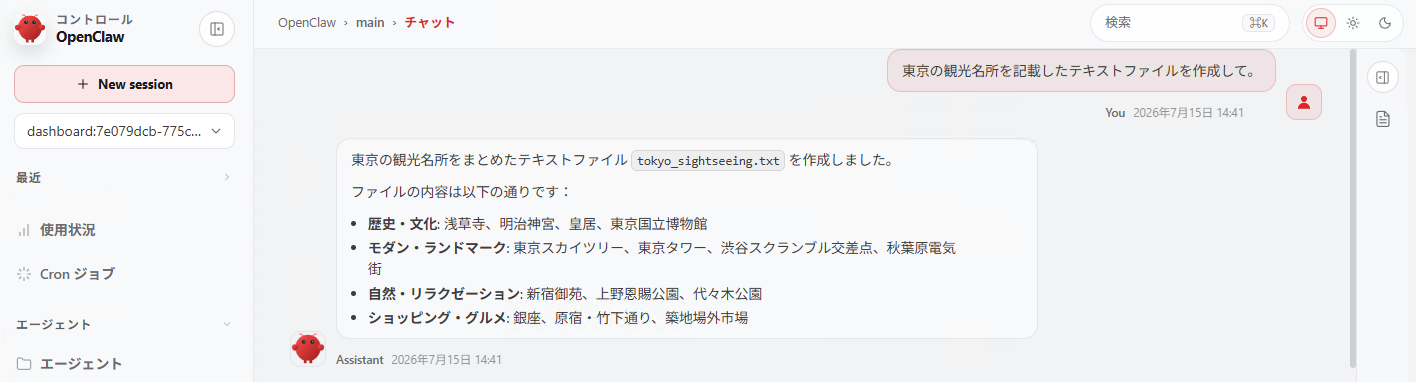
ブラウザでは、基本的にチャット画面で指示を出していきます。Onboardingや追加設定などで許可したツールや権限を使って、ユーザーのクエリに答えてくれます。
ただし、LLMの能力が低いと、失敗することもあるようです。。
Next Actions
- Onboardingでは、コンテナイメージのビルドが走っているが、Air-Gapped環境ではどのように利用できるのだろうか。
Onboard assumes network reachability for package fetches, container pulls, and provider validation. See open issues #4872 and #2218 (production-deployment epic covering air-gapped support, China network guidance, multi-host topology).